
Introducing Walmart Audiences on Vibe
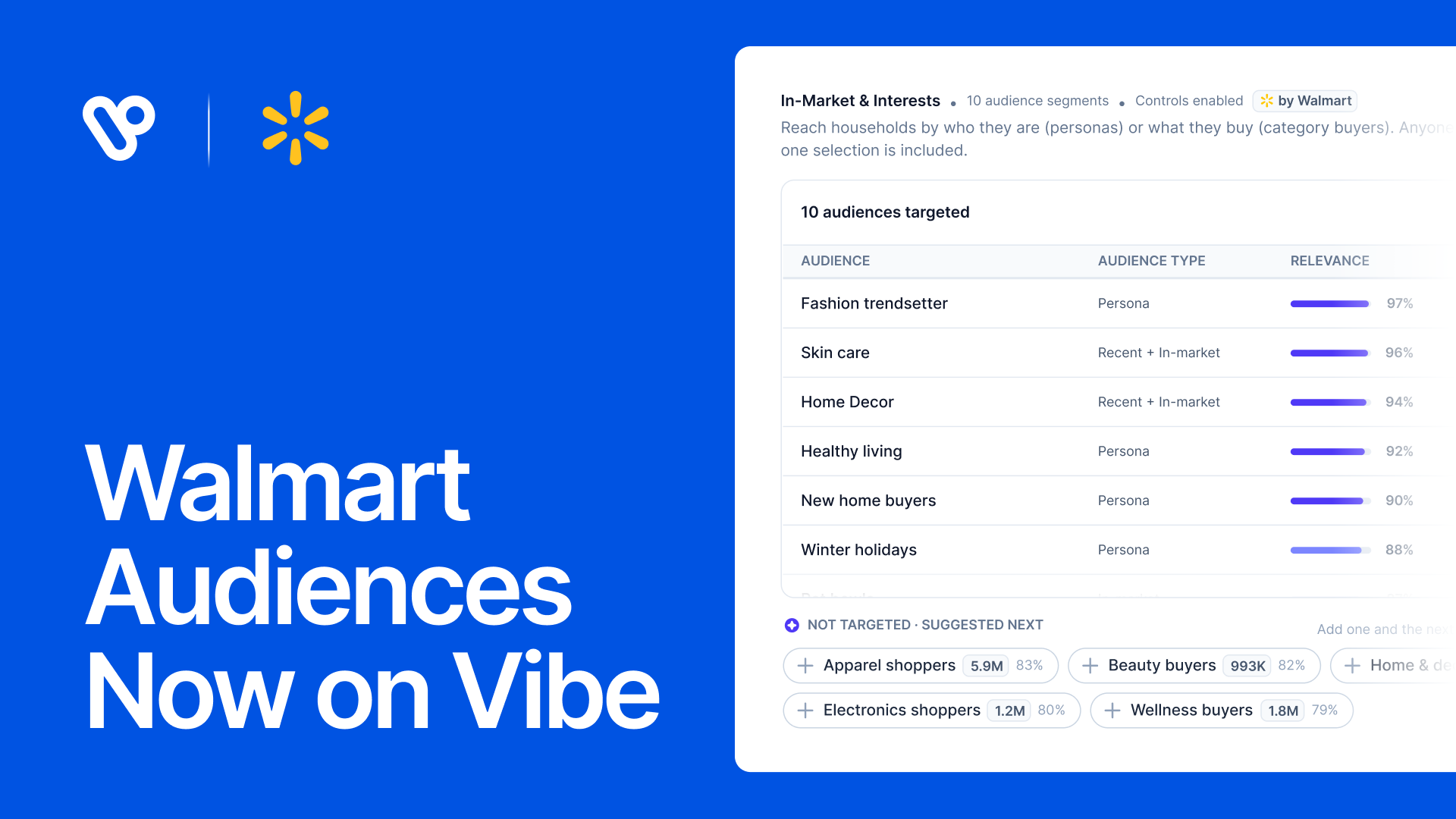
Walmart Audiences are now available in Vibe. You can target your CTV campaigns using audience segments from Walmart, built from Walmart's first-party commerce signals directly inside the Vibe campaign builder you already use.
Sell skincare? Reach the shoppers who just bought moisturizer, or are looking for a new one on the TV screen in their living room. If you sell moving services, you can reach upcoming movers. Pick the segments yourself, or let the Smart select agent read your website, category, creatives, and budget and propose a starting list that you review and edit before anything goes live.
Walmart Audiences are available to all Vibe users starting today. Open any new or existing campaign, go to In-Market & Interests, and the Walmart Audiences are there.
What's in the catalog
Walmart Audiences come in two types, and you can combine them in a single campaign.
- Personas include Walmart customers based on life stage, lifestyle, interests, and shopping habits, including at seasonal moments. Examples include women's beauty, men's grooming, healthy living, home gourmet cooks, recent movers, new parents, and upper-tier spenders. Seasonal personas are derived from customer shopping habits tied to holidays and events on the retail calendar, from Valentine's Day and Mother's Day to Big 6 Shopping Days and Winter holidays.
- Category buyers include Walmart customers based on what they buy or are showing intent to buy. They are organized by department: pet supplies, baby, food and beverages, electronics, automotive, crafts, and more. You'll find segments as broad as dog supplies and as specific as reptile food, quilting, whole bean coffee, or diesel exhaust fluid.
Each segment shows its estimated household count across Vibe before you add it, so you know the estimated targeting segment. As you add or remove segments, the estimated reach for your selection updates in real time.
The practical upshot: whatever you sell, there’s likely a segment that maps to it: a baby gear brand can target the new parents persona, a fitness app can target New Year, New You households in January, and a tax software brand can target the Tax Day persona in March.
Let the agent pick your audiences
A catalog this size takes a lot of scrolling. Smart select does the first pass for you.
When you open In-Market & Interests on a campaign, you can choose Smart select or Select manually. Smart select reads four inputs: your advertiser website, your advertiser category and any category rules, the creatives uploaded to the campaign, and your budget and schedule. You can also add your own context, like a product line you want to push or a customer type you want to avoid.
The agent matches your advertiser inputs against the names of the available Walmart Audiences, ranks audience segments by relevance, and checks the combined household count against your budget and flight dates. For a DTC skincare brand that sells on its own site, with a $25,000 budget running October 1 to November 30, that might read: keep the skin care, face serums, facial moisturizers, and skin care sets segments, plus the women's beauty and Big 6 Shopping Days personas, scoring 84% relevance or higher, covering 33.2M households across Vibe’s platform, with five more suggestions listed below if you want wider reach. It even reads what will resonate the most with your creative.
Relevance is an estimate of how closely a segment aligns with the inputs the agent considered. It is not a prediction of campaign performance.
If an input is missing, the agent says so. In the example above, no creative had been uploaded yet, so the agent worked from the website, category rules, and budget, and flagged that it skipped creatives.
Nothing goes live from Smart select on its own. Its picks land in your audience list, where you can remove any segment, switch a segment's audience type, or add one of the suggested segments from the "not targeted, suggested next" row. Each suggestion shows its relevance score and household count so you can judge the trade-off before adding it.
How it fits with your other audiences
Walmart Audiences sit alongside the targeting you already have available on Vibe. They don't replace it.
Your Vibe Custom Audiences (customer lists you sync to Vibe) and Web Audiences (people who visited your site) still live in their own sections of the campaign builder and work the way they did before. Locations, schedules, and placement controls are unchanged.
A common setup: use Walmart category buyers to reach new households in your category, and use Web audiences to retarget the ones who came to your site after seeing your ad. Within In-Market & Interests, a household that matches at least one of your selected segments is included.
Getting started
You don't need to change anything about your existing campaigns. They'll keep running exactly as configured.
To try Walmart Audiences:
- Open a new campaign, or duplicate an existing one.
- Go to In-Market & Interests. Segments from Walmart are marked "by Walmart."
- Choose Smart select to get a starting list, or Select manually to browse by persona and category.
- Review the list, adjust audience types, and check estimated reach against your budget.
- Launch as usual.
If you're running a campaign that already uses broad interest targeting, a simple first test is to duplicate it, swap the interest targeting for a few Walmart category buyer segments that match your product, and run both side by side.
If you're not already advertising on Vibe, talk to our team to learn how you can start using Walmart Audiences.
Measure CTV brand lift on Vibe with Upwave, DISQO, and Kantar
Measure CTV brand lift on Vibe with Upwave, DISQO, and Kantar
Select enterprise brands can now measure the brand impact of their Vibe CTV campaigns with Upwave, DISQO, and Kantar.
450 Apps Have Launched on Vibe's Developer Platform Since June
450 apps have launched on Vibe's Developer Platform since June, bringing CTV into audience, CRM, measurement, and creative tools via API.
Twilio Segment now sends conversions to Vibe.co
Vibe is now a conversion destination in Twilio Segment. Send the events you already track to Vibe server to server and measure CTV results.
Smarter bidding across every goal
Keanu 4.0, Carrie-Anne 1.5 and Laurence 1.0 are live on every Vibe.co campaign: +26% more outcomes at constant budget, +36% more households reached.
Fairing on Vibe: post-purchase answers become CTV conversions
Connect Fairing to Vibe so your streaming TV channels appear in your post-purchase survey, and the customers who credit TV come back as conversions.

Get started with Vibe
in minutes.


Industries
© 2026 Vibe, Inc.